Wow! Please! Do it again!: CM9
Showing posts with label CM9. Show all posts

Monday, July 9, 2012

SGS2 + CM9: Remove Yellow Triangle using Old Bootloader and USB Jig

Couldn't stand having the yellow triangle during boot.

1. Download GT-I9100_OLD_BOOTLOADER.7z from XDA here.
2. Extract GT-I9100_OLD_BOOTLOADER.tar.md5
3. Reboot into Download mode (long press Power Button > Reboot > Download).
4. Kill following Windows processes via Task Manager.
  • KiesPDLR.exe
  • KiesTrayAgent.exe

5. Connect phone to PC via USB cable.
6. Start Odin3-v1.85
7. Click on Bootloader button and select GT-I9100_OLD_BOOTLOADER.tar.md5
8. Click Start. Once done, it will display a "PASS!" message.


9. Phone will auto reboot.
10. Unplug USB cable.
11. Power-off phone.
12. Insert USB Jig. If successful, "ERASING DOWNLOAD INFORMATION SUCCEEDED" will be displayed.
13. Remove USB Jig.
14. Long press power button to shutdown.
15. Long press power button to boot/start phone.
16. No more yellow triangle!

SGS2 + CM9: Flash 20120709 Build

Faced my first soft brick today. I would never ever use Siyah Kernel with ROM Manager again!

1. Create backup via ROM Manager. BIGGEST MISTAKE EVER! Apparently I shouldn't be using ROM Manager with Siyah (which comes with the CWM app). Phone shut down and all attempts to revive it proved futile. No doubt, it's a soft brick! Screen only flickers with a white screen every few seconds. Unable to bring up recovery mode (Vol Up + Home + Power).
2. Tried (Vol Down + Home + Power) and able to bring up Download mode.
3. Downloaded CM9 Resurrection Edition (cm-9-20120420-ODIN-galaxys2.tar.md5)
4. Plugged in USB cable.
5. Killed both Windows processes related to Kies (Odin doesn't play well with Kies).
5. Started Odin3 v1.85
6. Click on PDA, selected cm-9-20120420-ODIN-galaxys2.tar.md5, clicked Start.
7. Phone rebooted with the yellow triangle.
8. Manual reboot into recovery
9. Restored backup from 30th June 2012 (prior to flashing Siyah Kernel).
10. Tried using USB Jig to get rid of the yellow triangle, but it doesn't seem to work anymore. Looks like CM9 Resurrection Edition came with ICS bootloaders? Aw, man!

Now, the usual steps to upgrade CM9 to the latest nightly + latest modem:

1. Copied cm-9-20120709-NIGHTLY-galaxys2.zip to internal SD card.
2. Verified MD5 sum b70209f77b0d2a550c348c33b73b7851
3. Reboot into CWM Recovery.
4. install zip from sdcard > choose zip from internal sdcard
5. Choose cm-9-20120709-NIGHTLY-galaxys2.zip and confirm.
6. Wipe cache partition.
7. Advanced > Wipe Dalvik Cache.
8. Reboot.
9. Reboot into CWM Recovery, again.
10. Flashed LPX modem. CM9 Resurrection Edition only came with LPQ modem.
11. Reboot.




Tuesday, June 26, 2012

SGS2 + CM9: Flash RC1 (20120626) Build

CM9 RC1 is out (it should be the same as the 20120626 nightly, cm-9-20120626-NIGHTLY-galaxys2.zip). Note: There are 2 RC1 downloads (cm-9.0.0-RC1-galaxys2.zip) on the same date but with different timestamp, checksum, and file size).

1. Create backup using ROM Manager.
2. Copied cm-9.0.0-RC1-galaxys2.zip to internal SD.
3. Verified MD5 checksum in ES File Explorer. (Checksum 7c91c25e2430f4432e63ac85c29d5a26)
4. Reboot into CWM Recovery.
5. Flash cm-9.0.0-RC1-galaxys2.zip
6. Wipe cache partition.
7. Advanced > Wipe Dalvik Cache
8. Reboot

MD5 checksum verified!

RC1

New CM Wallpaper!

Run #1

Run #2

Run #3


Sunday, June 17, 2012

SGS2 + CM9: Flash 20120617 Build

Nothing much to report on 20120605, except for that one time when it self rebooted after taking it out of my pocket.

1. Create backup using ROM Manager.
2. Copied cm-9-20120617-NIGHTLY-galaxys2.zip to internal SD. Transfer took roughly 3 minutes.
3. Verified MD5 checksum in ES File Explorer.
4. Reboot into CWM Recovery.
5. Flash cm-9-20120617-NIGHTLY-galaxys2.zip
6. Wipe cache partition.
7. Advanced > Wipe Dalvik Cache
8. Reboot. My first nightly featuring Cid in the boot animation.


Saturday, June 16, 2012

SGS2 + CM9 (20120605): Self Reboot

Happened on 20120614
1. Mobile data/3G on
2. Snapped a picture.
3. Received/sent some messages on WhatsApp
4. Put phone back into pocket.
5. Went up the elevator.
6. Took phone out of pocket and saw the boot screen!
7. Copied /proc/k_lastmsg as backup

Could this be caused by the Titanium Backup restore of Angry Birds data? Maybe, but... 1st June 2012, took out the phone from pocket only to find it dead. Couldn't get screen to wake up via power/home buttons. Had to long press power button to startup. Didn't even have Titanium Backup installed back then.

Monday, June 11, 2012

SGS2 + CM9 (20120605) + LPX: Restore Data only using Titanium Backup

It's not recommended to restore Apps/Data from Gingerbread ROMs via Titanium Backup after flashing CM9. Figured I'd give it a try anyway, as I'm not willing to go through the earlier levels of Angry Birds all over again (some are really a PITA).

1. Create backup via ROM Manager.
2. Installed Titanium Backup Free (v5.3.0) via Google Play Store.
3. I'd previously backed up the entire TitaniumBackup folder into my computer prior to flashing CM9. Copy the following 3 files back to the phone (path /sdcard/TitaniumBackup)

  • com.rovio.angrybirds-20120424-190010.properties
  • com.rovio.angrybirds-20120424-190010.tar.gz
  • com.rovio.angrybirds-b8874507e69061fb703245809291f119.apk.gz

4. Open Titanium Backup. In my case, it's already opened before copying the files over, so I had to "Reload application". My guess is "Refresh apps list" should work too.
5. Go to "Backup/Restore" tab
6. Select "Angry Birds 2.1.1"
7. Select "Restore"
8. Select "Data only" (already have application installed)
9. Done.

Restore "Data only"

At least I don't have to start from scratch...


Friday, June 8, 2012

SGS2 + CM9 (20120605) + LPX Modem: Battery Life (Overnight)

1. CM9 nightly build 20120605 (update-cm-9-20120605-NIGHTLY-galaxys2-signed.zip)
2. LPX modem (I9100XXLPX)
3. Wifi/3G off
4. Sync off

Fully charged at midnight

Rise and shine in the morning

Mobile signal strength at home sucks

2% for 8 hours. Not too shabby

Thursday, June 7, 2012

SGS2 + CM9: Flash 20120605 Build

Running 20120519 for 2 weeks++ already. Phone died once (shutdown itself while in pocket). Time to flash the latest build...

1. Copied update-cm-9-20120605-NIGHTLY-galaxys2-signed.zip to internal SD card. Transfer speed leaves much to be desired. I think it took more than a minute (for a 134MB file)
2. Verified MD5 checksum via ES File Explorer = 928e2629a7eadabf566c29fc8b934714
3. Created a backup using ROM Manager.
4. Reboot into CWM Recovery.
5. Flashed update-cm-9-20120605-NIGHTLY-galaxys2-signed.zip
6. Wipe cache partition.
7. Advanced > Wipe Dalvik Cache.
8. Reboot.

MD5 Checksum Verified!

Upgraded kernel 3.0.32!

Latest and Greatest: Google Maps Release 6.8.1 APK Download

Download latest (AFAIK) version 6.8.1 APK here (Google Drive) or scan QR code below.


Wednesday, June 6, 2012

SGS2 + CM9 (20120519): Flash LPX Modem

1. Create backup using ROM Manager.
2. Copied radio-cm-9-LPX-galaxys2-signed.zip to internal SD card.
3. Reboot to CWM Recovery (long press power button > Reboot > Recovery).
4. Flash radio-cm-9-LPX-galaxys2-signed.zip
5. Reboot.

Update: MD5 checksum for radio-cm-9-LPX-galaxys2-signed.zip is f7ed7fcabfec75794d5887ae6814fcef


Monday, May 28, 2012

SGS2 + CM9: Nightly Build 20120519 Battery Life (Full Day)

1. Fully charged at around 0130 hours (28/05/2012)
2. Wifi/MobileData/Sync off overnight.
3. MobileData/Sync on during drive to/from work.
4. Wifi/Sync on while in office.
5. Mobile network signal is considered weak throughout the day.

Battery Usage Screen (Top) 

Battery Usage Screen (Bottom)

History Details Screen (Portrait)

History Details Screen (Landscape)

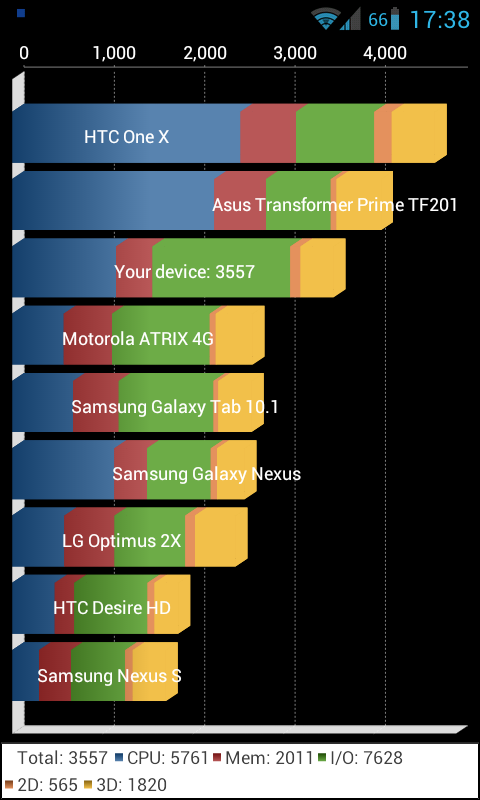
SGS2 + CM9: Nightly Build 20120519 Performance

This is the result of the 3rd consecutive run. 1st and 2nd runs are also in the 3400s


Sunday, May 27, 2012

SGS2 + CM9: MMS Battery Drain

Noticed that the "Messaging" app appearing in the Battery Usage screen. Then found out that it's due to an incoming MMS. See screen shots below.


Tried deleting both APNs for MMS (2G & 3G), but didn't work. The drain starts as soon as the MMS comes in.

 Restored the MMS related APNs (since removing them doesn't solve the battery drain)

Sunday, May 20, 2012

SGS2 + CM9: Flash 20120519 Build

Running 20120504 for 2 weeks already (Review: nothing to report). Time for an upgrade to the latest build 20120519...

Steps
1. Used ROM Manager to create backup. ROM Manager froze. Rebooted and tried again (still froze).
2. Rebooted into CWM Recovery. Created "advanced backup" from recovery mode.
3. Reboot.
4. Tried using ROM Manager to create another backup. Successful this time.
5. Copied update-cm-9-20120519-NIGHTLY-galaxys2-signed.zip to internal storage.
6. Reboot into Recovery (long hold power button > Reboot > Recovery > OK)
7. Flashed update-cm-9-20120519-NIGHTLY-galaxys2-signed.zip
8. Wiped cache partition.
9. Wiped dalvik cache.
10. Reboot.
11. Done

Build number looks a little verbose

Friday, May 11, 2012

Latest and Greatest: Google Maps Release 6.7.0 APK Download

CM9 (CyanogenMod 9) + gapps (Google Apps bundle) does not come with Google Maps. Not even available in Google Play Store for download (This app is incompatible with your Maxis Samsung GT-I9100). Probably due to region (Malaysia). Download latest (AFAIK) version 6.7.0 APK here (Google Drive) or scan QR code below.


Sunday, May 6, 2012

Saturday, May 5, 2012

SGS2 + CM9: Flash 20120504 Build

Looks like a long list of features/fixes to be included in the following build (the one after 20120504). Flashed 20120504 to get the kernel upgrade (from 3.0.29 to 3.0.30).

Steps
1. Used ROM Manager to create backup
2. ROM Manager prompted to install CWM Recovery? Proceed.
3. Phone rebooted to re-flash CWM Recovery (downgraded to v4.*, should be v5 previously)
4. Used ROM Manager to create backup, now successfully.
5. Copied update-cm-9-20120504-NIGHTLY-galaxys2-signed.zip to internal storage.
6. Used ROM Manager to reboot into Recovery.
7. Flashed update-cm-9-20120504-NIGHTLY-galaxys2-signed.zip
8. Wiped cache partition.
9. Wiped dalvik cache.
10. Reboot.
11. Done


SGS2 + CM9: Nightly Review 20120427 (Week 1)

CM9 build 20120427

1. Performance
  • Quadrant lowest/highest score 3000/3500. Able to get 4000+ in CM7.1
  • Antutu average score  5776.
  • Noticed lag when playing Angry Birds.
  • Occasional lag during transition from Home to App Drawer.

2. Stability
  • No freeze or hard/soft reboot happened so far.
3. Battery Life
  • Can't complain.
4. Issues
  • Mobiledata toggle in the notification drawer will not work correctly when Wifi is enabled.
  • USB OTG not working? /sdcard/usbStorage empty after plugging in. However, it appears under Settings > Storage as an "SD Card"? USB OTG working as expected. The path is now /mnt/usbdrive.

Saturday, April 28, 2012

SGS2 + CM9: The plunge - CyanogenMod 9 (CM9)

Running CheckROM RevoHD V4 for a couple of months already, time to take the plunge..


Steps:
1. Factory reset phone
2. Format USB storage.
3. Copied latest CM9 build (20120427) and Google Apps (gapps) package (20120422) using USB OTG.
4. Reboot into CWM recovery.
5. Flashed CM9 and gapps
6. Wipe data/factory reset
7. Reboot phone
8. Spent few minutes in awe.
9. Noticed APN settings missing, and unable to add new APN
10. Downloaded latest modem (LPS)
11. Reboot into CWM recovery
12. Flashed LPS modem
13. Reboot phone.
14. APN settings are now in place. Able to connect to 3G (mobile data)
15. Installed a couple of apps (WhatsApp, Angry Birds, Draw Something, ES File Explorer, Gmail, Google Reader, Quadrant Standard, NoLED)

The Good
Looks good, and pretty smooth (although at times, noticed minor lags during transition between home and app drawer).

The Bad
1. No Google Maps application. Unable to find it on Google Play (app). Went on the web version and it states that "This app is incompatible with your Samsung GT-I9100"? Downloaded the apk and all is good.